Related notes: CFX, Unreal Animation, Animation
Files: SOP_KineFX.hiplc
Kine FX
Attributes
- Joint
- Point that is part of hierarchy (defined by hierarchy). In world space
v@P- positions@nameunique per point + As topology change rest of points stays where supposed to3@transform(9flt - matrix) - global transform: (matrix3) rotation, scale (joints orientation)
- Point that is part of hierarchy (defined by hierarchy). In world space
- Controls
- Control animation with UI handle
@nameon prims
- Control animation with UI handle
- Stash Pose / Bind Pose
- T or A pose saved into attribute.
4@rest_transform- (16flt - matrix) - add 4x4 [ Rig Stash Pose ] >@rest_transform
- T or A pose saved into attribute.
- Geometry
- Mesh with weights
s@nameon prim@boneCaptureon point
- Mesh with weights
Export
- Mesh / Bind Pose / Animation
Skeleton
- Rotation order,
RzRyRxdepend on skeleton and its joint rotation (unreal Y is -Y in Houdini) 1. one with bone (look at from parent to child) 2. component represent twist toward twist. - Splines starts from root to child. Create from
Poly lineorL-system. - When to apply rotation:
Pre-multiply- localPost-multiply- parent
Components
- Hierarchy
- Determined by vertex index order (always in specific order - always follow curve)
PolyPathSOP can fix hierarchy by rebuilding vertex order.ReverseSOP change direction.
- Determined by vertex index order (always in specific order - always follow curve)
- Transforms
- Worlds space For rigging. Ground truth.
@transform(9flt) - Rotation and scale only. Position from @P.
- Local space For animation. Calculated per operation.
@localtransform(16flt). - Position, rot and scale.Compute transforms- recalculate local transform
- Scale Inheritance - What happen to other bones when we scale one
@scale inheretance@_efectivelocaltransform(16flt)
- Worlds space For rigging. Ground truth.
- Names
- Unique string on points.
Create Skeleton from scratch
Manual setup
- Name
NameSOPEnumerateSOP (string on points)
- Orientation
Orient JointsSOP - Orientation mater only for hand drawn Houdini rigs. To fix orientation. Re-orient joints with direction picking.Orient along curveSOP - Mor options to create transform. ([x] 3x3 transform, [x] next edge for tangent, [ ] t urn off N and tangentu)
Automatic setup
SkeletonSOP - Click stash input to freeze (like cache). you can disconnect. not for procedural updateRig doctorSOP - Create all missing attribs: names@name, transforms: point:v@transform,p@localtransformand debug hierarchy.
![[createskeleton.png]]
Skeleton Create Tool
Skeleton SOP
- Can control bone placement, rename bones, orient selected bones. It create
@localtransform. (with correct orientation) - Shortcuts
RMBmenuP- details of joints.- placement type - can place in middle of geo or on top
- Add to Skeleton
- in separated skeleton and capture
Skeleton Operations Nodes
Skeleton Mirror SOP
Parent Joints SOP
Delete Joints SOP
- Delete with reparent.
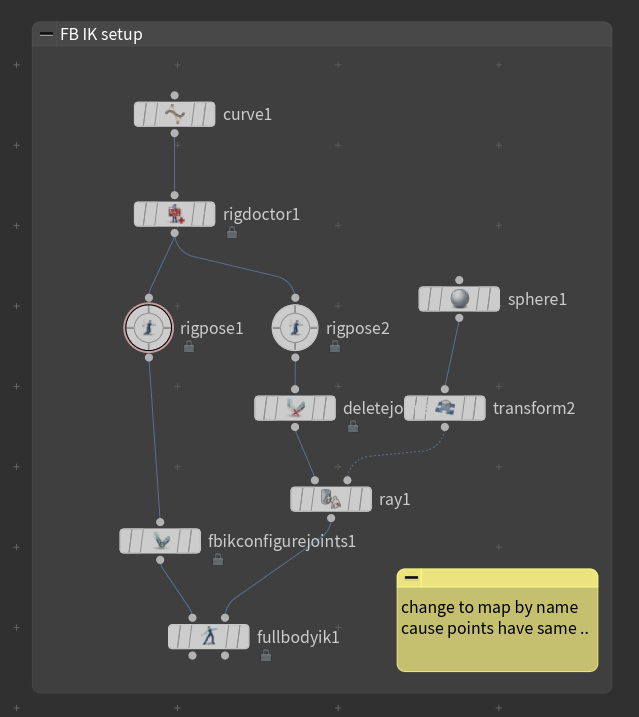
Configure Joints SOP
- Create dictionary attribute
@fbik_jointconfigon points. witch:rest xformLocal ! (rest transform attribute is recomputed),- rot low
limitsin radians, (limits - shown as orange rect ) - and
rot order
- Modes:
Full Body IK- most complex - local center of mass, … rotation weights/limitsRagdoll- only rotation constraints limitsRig Pose- rotation and translation limits
- Shortcuts:
Shift+7/8- to configure limit.Shift+F- to flip handle
Skeleton Blend SOP
- Blend skeletons / anims (feed with 2 animations)
Repair Nodes
Realistic Shoulder SOP -
Reverse Foot SOP -
Stabilize Joints SOP
- Select joints to stabilize, will identify automaticly - not solve. > Delete SOP to get only joints to stablize > use : full body ik
Capture
Capture rigid
- [ Capture Packed SOP] - [x] pack input & unpack Output. Manual capture: geo: * joint name of joint
Capture soft
| 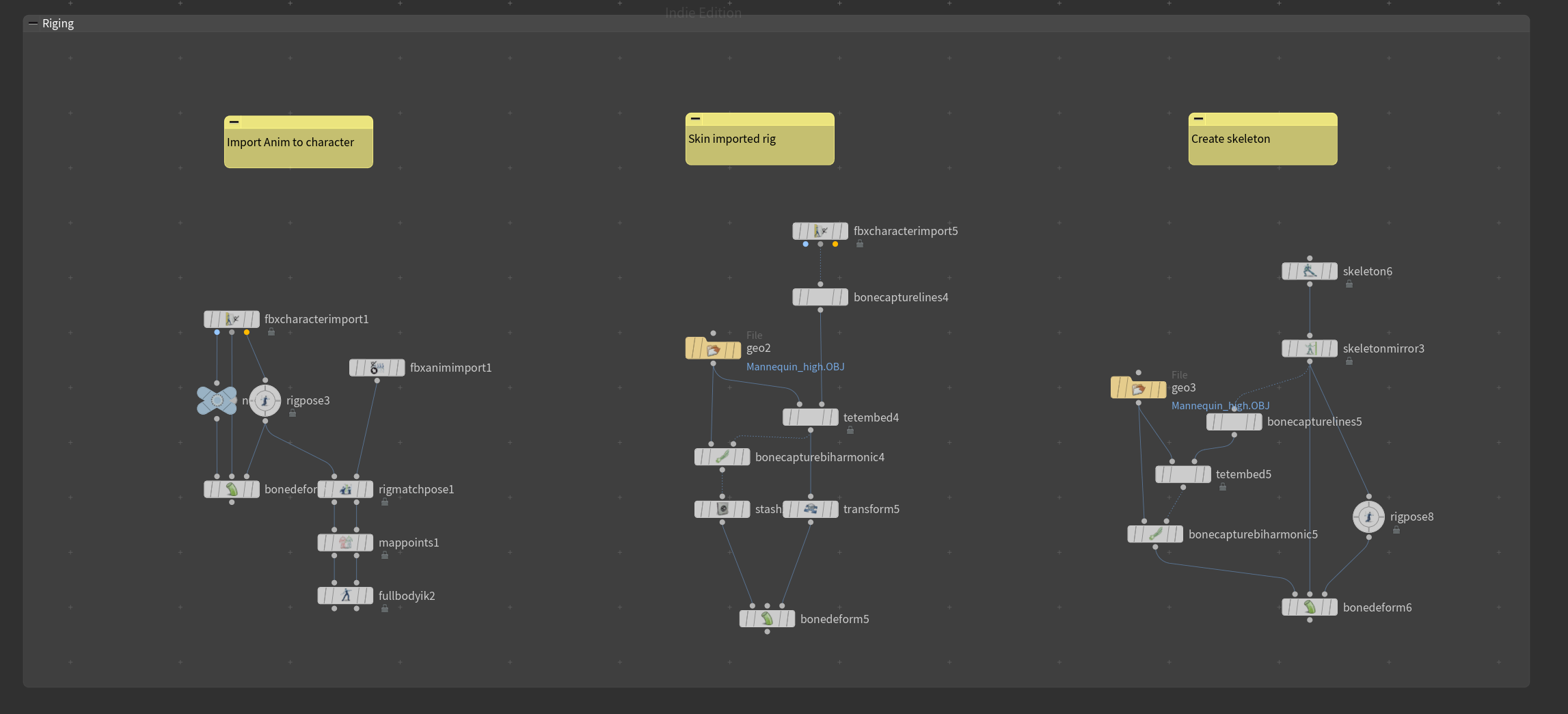 |
Capture pipeline:
- [ Bone Capture Line SOP ] - define capture regions @joints
- [ Tet Embed SOP ] - create mesh weightings op2 bonecapture
- [ Bone Capture Biharmonic SOP ] - transfers weights to skin op1: , op2: tet
Paint Capture
- [ Capture Layer Paint SOP ] - Use for overpaint rig weights. (per region name so semi procedural)
RMBto switch between functionalitie. Can loose information simetimes so cache bgeo.sc later !!!!bonecapture attribute@points
- boneCapture region
bone Capture w
region with highest influence will be first . by default 6 regions


https://youtu.be/p3zG1wos2nk

LIMIT Regions from 6 to 4 for games


`capture attrib pack / unpack SOP]``
- [ Capture Layer Paint ] older. ?
- [ cpature mirror ]
Rig ( Legacy KineFx )
Constraints
Control only selected bones through other bones in a specific way. Control Skeleton control Source Constrain to match.
IK/FKOffset Transform-Blend Transform-Parent Constraint-Re-Parten ConstraintLook at ConstraintorLook at (kinefx)- drag 3 vectors from viewport
IK Constraint
IK - Target and Control bones to steer each other. Target bone + Elbo to control rotation
IK Chain
IK Chain SOP.
- op1: skeleton. op2 control points with same name (reparent sop with *)
- select root mid and tip bones points.
- set! match by name or names for controllers
- manipulate pose before 2 op of ik chain
VOP
Two Bone IKVOP - Copy of IK Chain SOPVEX
solvefbik()
solvephysfbik()
solveik()
Full body IK
Have different solvers types:
- Physical full body IK - default
- FABRIK (forward / backward reaching) - We lose feature (no rotation, more robotic)
How To Setup:
- Input controls to second op2
Delet joints- rest will become controlsParent jointsSOP with*
- Setup
Fullbody IKSOP solver.- match by attribute (name) - names must match!
- can pin root
- can compute weight
- Damping - can smooth.
VOP
- `Solve IK` VOP - Mix IK chain SOP & Fullbody IK. We can have many bones in between
FK Constraint
FK Transfer
Solve Curve - Spline IK VOP
Solve curve with normalized bone lengths
RIG VOP: take all points from in and out and drive one another.
get point transformsVOP - from first inputget point transformsVOP - from second inputsolve curve- set targets and ctrl & ctrl files- type curve: must match type curve from ctrl curve input
set transformVOP - > points and xforms to out https://youtu.be/ZUBSQ-2BkMo?t=1071
Controls
Control (or any geo) + prim name
AtachControlGeo SOP
attach joint geo(as 3op of pose tool) still technical approach. (next release for artists approach)
Rig (APEX )
APEX
Rigs as operations - a separation of concerns. (Shadow rig) hierarchy to control rig > clean for export. Separate logic with execution (transform) in rigs, which is often bottleneck like when using Rig pose SOP & Rigdeform SOP.
Packed Folders
structure - with proper names and types. clearly define elemets to operate on them explicitly
Pack folder SOP name: Base (defauolt naming conv), Type: skel (can choose from list )
1. Base.rig (rig)
2. Base.skel (skeleton)
3. Base.shp (shape)
4. Guides.skel
(you can see whats inside with rig tree)
Auto rig Component
Adding and manipulating graph At begining nothing will show up, because we need to define what we want
Component Source: - choose which functionality
Rig - source add/update - depend on what is in packed folder
Skeleton -
	1. Autorig  Component SOP dropdown list: FK
		1. you need to promote transformgroup: * rotationgoup: * scalegroup * (or use point* if 'point' in name )
	2.  Configure Controls SOP
APEX resources: https://youtu.be/-0KbPtoP5MU —
Animation
Motion
Motion Clips
Geometry place in space. To chop anims. Give sense of timing, (timeing is spaceing)
[ Motion Clip ] . Not time dependent (see all frames at once). One packed primitive per frame with @time attrribute. To operate on neighbour frames.
[ Motion Clip Evaluate ] - Time dependent Animation - One pose per frame.
- [ Configure Clip Info ]
- [ Motion Clip Extract ] - Extract Frames
- [ Motion clip retime ] –
- …
Mix Animations
- [ Motion Clip Blend ] - kitbash 2 files. 1 as base second for mix. Can delete some bones and apply partial animation.
- [ Motion Clip Cycle ] - show locomotionb joint (root) / blend start to end
- [ Motion Clip Sequence ] - blend (Mode: different match transition), blend frames
Animation
Procedural Animation
Rig Attribute Wrangle & VOP
Curl few points.
Rig Attrib VopSOP - inside for each we haveoffsettransformnode where we can do operation. ![[transformanim.png]]Rig attrib wranglerSOProtate(3@localtransform, @Time, {1,0,0});prerotate(3@localtransform, @Time, {1,0,0});- it applies the rotation to the matrix before move
rotate(4@localtransform, radians(10), {1,0,0})
// scale()
// translate()
float f = @ptnum / (npoints(0)-1.0);
    //f= fit(@ptnum,0,npoints(0)-1.0,0.0,1.0);

float maxang = chf('maxang');
maxang *= f;
matrix rotmat = ident();
rotate(rotmat,radians(5), set(1,0,0));
4@localtransform *= rotmat;
Look At other bone
Rig Attrib Vop- Get root and target bones from input 0 & 1 then look at constraint ![[Pasted image 20250511233735.png]]
Key Animation
[ Rig Pose ] - initial frame or per frame anim
- rotation limits of your joints in the
Bake - .???
Shortcuts
Q,A,Z,Z+Shift- cycle through joints.- Motion Path
LMB- AddMMB- move timeline Ctrl+LMB- Add key on path
Mocap
Root motion
[ Extract Locomotion ] - extract root motion
- use hip joint
- create temporal joint named locomotion > later transfer this motion to root.
- apply motion back: [Rig pose] with:
point("/obj/geo/extractlocomotion",24, "P", 0)
Optimize
motion clip extract key poses- optimize mocap
Secondary motion
- [ Rig Statch Pose ]
- [ Secondary Motion ] - to convert to clips
- source joint group as root It need to be animated. (have delta in local transform)
secondary motion- jiggle / spring / lag/overshoot
- [ Evaluate Motion Clip ]
Simulation Ragdoll
Bullet and scale must be accurate
- [ Rig Stash Pose ]
- [ Configure Joints ] - Mode: Ragdoll
- [ Ragdoll Collision Shape ]
- Setup spheres [in construction of colliision shape can use custom but
nameon prims is required, and collision should be packed] - Aan add properties like: mass
- Setup spheres [in construction of colliision shape can use custom but
- [ Ragdoll Constraints ]
- Internal Constraint: op1: ceeate cone (limit) constraints on collision spheres. (soft and hard constr.) (can use additional outside go (3op)) That will hold collisions toghether
- External Constraint op2: constraint joint to geometry group (glue, hard (pin and stuck), soft)
- if no group will take closest ??
- [ Ragdoll Solver ]
- type:
- RDB Impact Data ()
Simulation Vellum
Retarget
![[retarget.png]]
Retarget
- [ Rig Match Pose ] - lineup pose in viewport (Align target skeleton 2op is master )
- [ Map Points ] - 2 . match points
- [ Full Body IK ] - final retargeting > can weight here. fist place to correct retergeted motion // Crack IK transfers & rotates:
- [ FK Transfer ] -
- [ Skeleton Blend ] - i.e. fullbodyik/fktransfer
[ Rig Match Pose SOP ]
- March size: Source Skeleton - to leave UE5 source character (not anim)
VEX
[Rig Attrib Wrangle] SOP
Find root
#include <kinefx.h>

int ancestors[] = getancestors(0,@ptnum,-1);
int root = ancestors[-1];
s@root_path = point(0,"path",root);
[ Rig Attribute VOP ]
 ![[constraintsa.png]]
RIG VOP is in Detail mode
Get Point TransformImport point to VOP (like bind) can drag points directly from viewport.Set Point Transform- Export data from VOP
Transform
xform- is working param (world transform of joints)localxform- (relative to parent) local transform - (relative to parent) scale not effecting need 2 jointseffective localxform- scale inheritance attributei@scaleinheritance = chi("scale_inheritancei");
YT Rok Andic
cgwiki
V Ron Andic channel
YT KineFX A Simple IK/FK
KineFX Masterclass | Houdini Illume | Jeff Wagner
Henry HIVE
Houdini KineFX 101: Tutorial One - FBX Import, Rig Pose, Skeleton Blend
Agent from skeleton - crowds
https://www.youtube.com/watch?v=RTNVyGbpwv0&ab_channel=RohanDalvi
https://www.sidefx.com/community-main-menu/character-workflow-rig-animate-secondary-motion/
Kurs Vimeo + PDF
YT SideFX - Fur dude, YT SideFX PDF
YT Jeff Masterclass
YT Rok Andic channle
YT Rok Andic patreon
YT Rok Andic site
SideFx Elephant
SideFX Tokyomegaplex CHRISTOPHER RUTLEDGE
YT siggraph hive 2022
Junichiro Horikawa - Robot rig
Junichiro Horikawa - Plant rig
mechanic Rus
mechanic Entagma
curve solver VOP
Mixamo to Cascadeur to Houdini
https://vimeo.com/686814178?embedded=true&source=vimeo_logo&owner=1723479
- [smoth motion] SOP